
Verity Mod MinecraftVerified Minecraft mod download guide
English
AI setup guide

Verity AI Setup: 5 Steps for Groq, Models and API Errors

Short answer: Verity JE uses Groq-powered AI for its yellow assistant. Confirm the correct Java build, create your own Groq API key, follow the setup screen or project tutorial for the current version, keep the key private, and test in a fresh world. This guide covers AI configuration; microphone, voice chat and TTS troubleshooting stay in the separate voice guide.

Verity JE yellow AI assistant floating above a Minecraft forest
Official Verity JE project media from Modrinth. The project describes Verity as a Groq-powered personal AI assistant; it is not a Mojang or Microsoft feature.
verified baseline

Verity AI Facts Checked on July 29, 2026

Primary keyword verity ai
AI provider named by the project Groq.com
Current Java release Verity JE 5.7.3, published July 18, 2026
Minecraft and loader Minecraft 1.20.1 with Forge
Verified file verity-5.7.3.jar, 246,481,139 bytes
Language limit AI supports all languages; STT and TTS were tested only in English
answer first

What Verity AI Is and What This Setup Changes

Verity AI is the conversation layer inside the Java mod, not a separate download and not a generic voice generator. The Verity JE project page says the mod adds a personal assistant powered by AI at Groq.com. That connection lets the yellow character respond more flexibly than a fixed dialogue tree, while the mod itself still controls the Minecraft entity, box, Demon and world events.

The setup therefore has two parts. The local Minecraft part must match Verity JE, Minecraft 1.20.1 and Forge. The online AI part needs a valid provider key and network access. Replacing the .jar will not fix an invalid key, and changing an API key will not fix the wrong Minecraft loader. Keep those two layers separate while troubleshooting.

Similarweb global keyword data supports a dedicated page for this intent: verity ai showed recent-window volume 13,260 with difficulty 33. The adjacent term verity tts showed volume 4,460 and difficulty 12, but TTS, microphone and player voice chat require a different diagnostic path. This page owns AI and Groq configuration; the Verity voice setup guide owns TTS and microphone behavior.
freshness gate

Verify the Verity JE Version Before Adding an API Key

This is a download-intent site, so version freshness comes before configuration advice. On July 29, 2026, the Modrinth API still returned Verity JE 5.7.3 as the newest listed release. It was published July 18, 2026 for Minecraft 1.20.1 and Forge. The primary file was verity-5.7.3.jar at 246,481,139 bytes.

The Modrinth CDN download resolved to HTTP 200 with content type application/java-archive and the same content length. No newer first-party Java release appeared, so the site's existing version and download fields did not need a refresh. This page links to source pages rather than inventing another mirror or an unofficial AI-ready build.

If your screen or config differs from a video, compare its publication date and Verity version before assuming your installation is broken. Interface labels and supported models can change between builds even when the overall Groq setup remains similar.

Check Verified result Why it matters
Project Verity JE on Modrinth, project ID on1Y0osD Avoids unrelated Verity, movie and voice-generator results
Release 5.7.3 for Minecraft 1.20.1 Forge Keeps the tutorial aligned with the current Java build
File verity-5.7.3.jar, 246,481,139 bytes Lets you check the filename and source metadata before launch
AI provider Groq.com named in the project description Prevents using instructions for an unrelated provider by accident
setup workflow

5-Step Verity AI and Groq Setup

Use the official setup tutorial embedded below together with this checklist. The project page is the authority for the exact field names and model options in your version; this guide explains what to verify around those steps without guessing a config path that the source does not publish.

Create the first test in a disposable Minecraft profile and a new world. Verity can affect normal gameplay, and a small test profile makes it easier to distinguish a Java/Forge problem from an AI authorization or network problem.

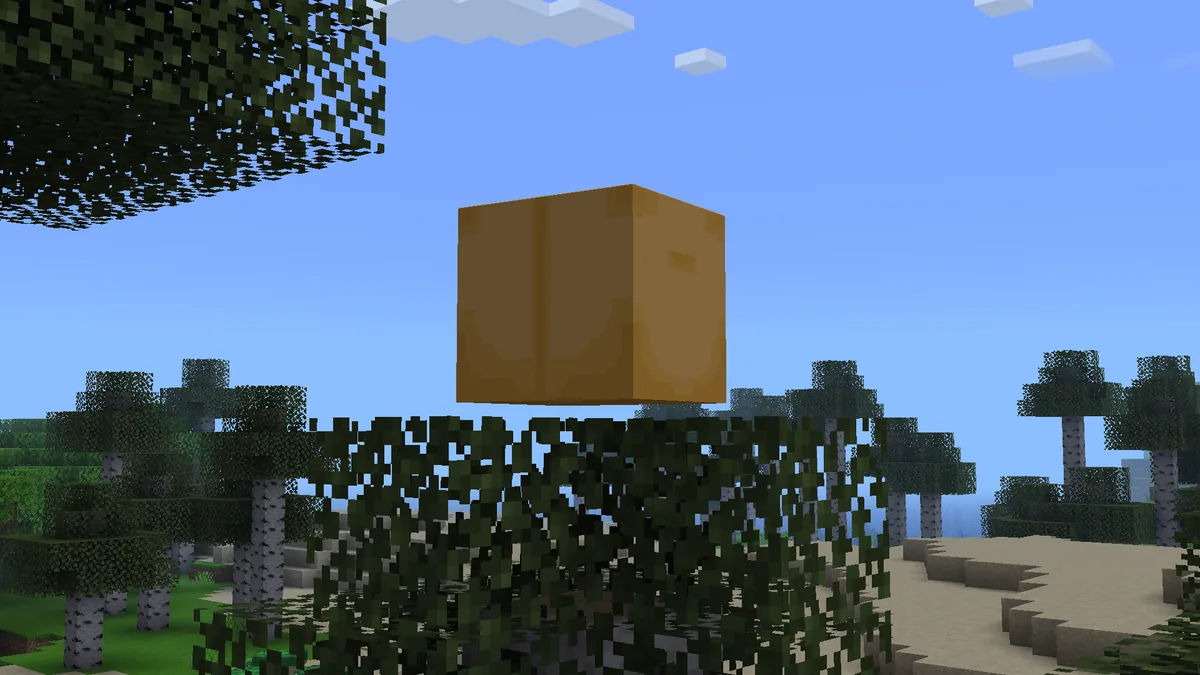
Official Verity JE gallery screenshot of the animated box in a Minecraft world
Official Verity JE project media from Modrinth. Verify that the base mod loads and its box appears before diagnosing the online AI connection.
Setup tutorial embedded by the Verity JE Modrinth project. Use it for the current on-screen field sequence; never expose your own API key while following along.
1

Confirm the Java baseline

Use Verity JE 5.7.3 with Minecraft 1.20.1 and Forge, or match the exact newer source release if one appears after this check.

2

Create your own Groq key

Use the official Groq console and account. Do not copy a key from a video, Discord message, paste site or shared modpack.

3

Follow the current setup field

Enter the key only where the Verity project tutorial or current setup screen requests it. Do not paste it into chat, screenshots or public config uploads.

4

Keep the version's model choice

Use the source tutorial's current model/default unless your build explicitly supports another one. A model name from an older video may no longer be available.

5

Test one prompt in a fresh world

Check that Verity loads, the network request completes and one simple response works before enabling a large modpack or voice extras.

key safety

Where to Put the Groq API Key Without Exposing It

An API key is a credential. Treat it like a password even if you created it only for Minecraft. Enter it in the field or local configuration location shown by the current Verity tutorial, then close the screen before recording or sharing screenshots. The public project page does not document one permanent config filename, so this guide does not invent one.

Do not place the key in a public GitHub repository, Discord support post, crash-log paste, livestream overlay or downloadable modpack. When asking for help, redact the full value. Showing the first or last few characters can still make key matching easier, so the safest screenshot excludes the field entirely.

If a key may have leaked, revoke it in the provider console and create a replacement. Merely deleting the screenshot does not make a copied credential safe again. A dedicated key also makes usage easier to identify and revoke without affecting another project.

  • Use a key from your own Groq account.
  • Do not bundle the key inside a shared Minecraft profile or modpack.
  • Redact the entire key before posting logs or screenshots.
  • Revoke and replace a key after any accidental exposure.
  • Review provider usage and limits instead of repeatedly retrying a failing request.
models and language

Model Choice, AI Languages and the English Voice Limit

The Modrinth description says the AI supports all languages, but it separately warns that speech-to-text and text-to-speech were tested only in English. That means a typed conversation in Spanish, Japanese, French, German, Portuguese, Korean or Italian may be within the advertised AI scope while spoken input or output can still fail or sound wrong.

Do not confuse a language response problem with an invalid key. First test a short English typed prompt. Then test your preferred language. Add STT or TTS only after text responses work. This sequence shows whether the failure belongs to authorization, model availability, language handling or voice processing.

Model availability belongs to the provider and the current mod build. If the official tutorial names a default, begin there. If you see a model-not-found error, recheck the current project instructions and Groq console rather than copying a model ID from an old video. For microphone permission, voice chat and TTS-specific errors, continue with the voice setup guide.

Test Expected signal Next decision
Typed English prompt Basic AI authorization and response work Proceed to your preferred language
Typed local-language prompt The AI returns a useful response Keep text mode or test voice separately
Speech-to-text English is the only tested language stated by the project Treat other-language failures as an unsupported/untested voice case
Text-to-speech Voice output works without changing the AI key Troubleshoot TTS separately from Groq authorization
error matrix

Fix Verity AI 401, 403, 404, 429 and Timeout Errors

Read the exact error before changing files. An HTTP-style code usually describes the provider request, not the Minecraft .jar. Reinstalling Verity may hide the original evidence while leaving the key, model or quota problem unchanged.

After each change, make one controlled test. Rapidly repeating prompts can turn a simple configuration mistake into a 429 limit and make diagnosis harder. Keep a note of the Verity version, Forge version, error code and whether a typed English test succeeded.

Symptom Likely layer Safer next step
401 unauthorized Missing, invalid, expired or malformed key Re-enter a current key in the official setup field; revoke it if exposure is possible
403 forbidden Account, policy or permission restriction Check the provider account and project instructions; do not download a replacement key
404 or model not found Old endpoint or unavailable model name Use the current tutorial/default and verify model availability in Groq
429 rate limit Quota, burst rate or cooldown Stop retrying, review usage and wait or reduce request frequency
Timeout/no response Network, provider availability, firewall or overloaded request Test basic connectivity and one short prompt before changing the mod
Verity or the box never loads Minecraft, Forge or mod compatibility Return to the Java/install guides; AI settings cannot fix a base-load failure
privacy and limits

What Leaves Your Computer When Verity Uses AI

A cloud-powered assistant must send request data to the configured provider to generate a response. Do not type passwords, private server addresses, personal information or anything you would not want processed outside the game. The exact request fields and retention behavior depend on the current mod and provider, so check their current documentation instead of assuming Minecraft chat stays local.

Provider pricing, free limits and available models can change independently of Verity JE. This guide does not promise free unlimited use. Review your Groq account usage and current terms before long sessions, shared servers or automated prompts.

For multiplayer, tell other participants when AI-powered interactions are active and avoid sharing one private key across a public server. Server owners should decide who controls the credential, who can trigger requests and how unexpected costs or limits are handled.

decision boundary

Use the Right Verity Guide for the Problem

Use this page when the base mod loads but the AI setup, Groq key, model or provider request does not. Use the Java guide when you need the correct .jar and Forge baseline. Use the install guide when Minecraft cannot load the mod. Use the voice guide when typed AI works but microphone, STT or TTS does not.

That boundary prevents cannibalization and also makes troubleshooting faster. One error should have one primary diagnostic page instead of eight near-duplicate articles that repeat the same download facts.

Your question Best page Reason
Where do I get Verity JE? Java guide Owns version, loader and file-source intent
How do I add the Groq key? This AI setup guide Owns provider, credential, model and API-error intent
Why is the microphone or TTS silent? Voice setup guide Owns microphone, STT, TTS and voice-chat intent
Why does Verity change the world or spawn the Demon? Verity Horror guide Owns mechanics, ARG and Demon intent
recap

Verity AI Setup Checklist

Confirm Verity JE 5.7.3 for Minecraft 1.20.1 Forge, create your own Groq key, follow the current project tutorial, keep the credential private, test one typed English prompt and only then add local-language or voice features. Diagnose the exact code before replacing files.

The important limit is simple: this page verifies the provider, release and published language note, but the project tutorial remains the source of truth for fields and model options that can change after an update.

next checks

Related Verity Guides

AI setup FAQ

Verity AI and Groq FAQ

Does Verity Mod use AI?

Yes. The Verity JE Modrinth project says its personal assistant is powered by AI at Groq.com. The Minecraft entity and gameplay features still come from the Java mod.

How do I add a Groq API key to Verity?

Create your own key in the official Groq console, then enter it only in the setup field or local configuration location shown by the current Verity JE project tutorial. Do not share the key in screenshots or logs.

Why does Verity AI show a 401 error?

A 401 usually means the provider did not accept the credential. Recheck the key and current setup field, and revoke the key if it may have been exposed.

What does a 429 error mean in Verity AI?

A 429 usually points to a provider quota, burst rate or cooldown. Stop rapid retries, review account usage and wait or lower request frequency.

Which Groq model should I choose for Verity?

Start with the model or default shown by the current Verity JE tutorial. Model availability can change, so do not rely on an old video or a model name from another mod.

Does Verity AI work in languages other than English?

The project page says the AI supports all languages, while speech-to-text and text-to-speech were tested only in English. Test typed responses first and troubleshoot voice separately.

Can I share one Groq key with a modpack or server?

Do not publish or bundle a private key. Use controlled credentials, review provider usage and revoke any key that has been exposed.