Verity Mod MinecraftVerified Minecraft mod download guide
English
Edition guide · source check: October 3, 2026

Minecraft Bedrock Horror Mods: 3 Picks & Version Checks

Short answer: Bedrock horror mods are usually community Add-ons, not Java .jar files. The three projects below cover a slow anomaly, a larger survival overhaul and a clearly marked demo. Their newest checked files name Bedrock 26.50 or 26.40, while the latest official Bedrock hotfix checked here is 26.52. That gap matters: none of these project pages explicitly lists 26.52 support, and this guide does not claim to have play-tested them.

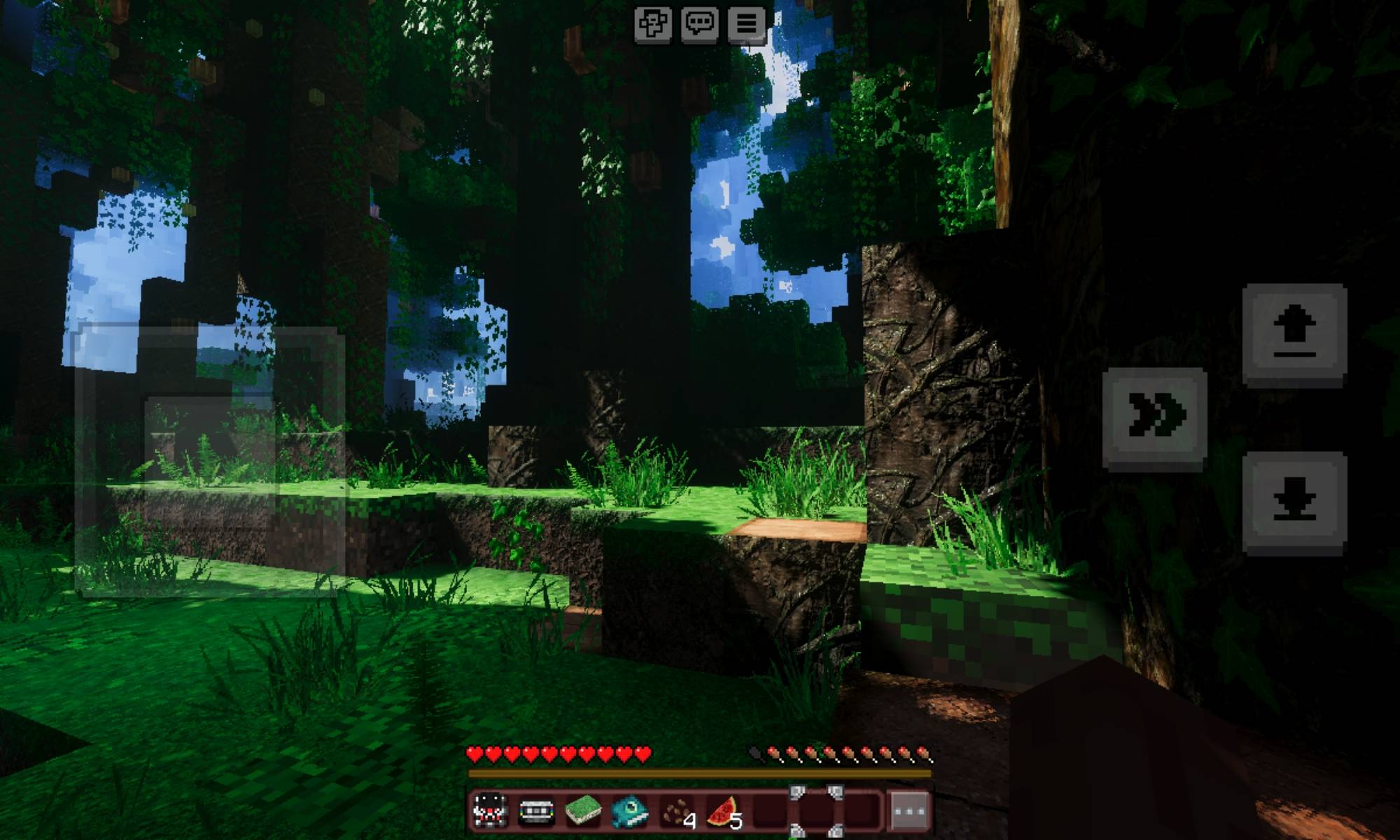
Creator-uploaded Minecraft Bedrock screenshot from Nightmare Overload showing a dark forest path, mobile controls and the game HUD
Project media uploaded by Potato_0212 to the Nightmare Overload CurseForge page. The creator says this preview uses Vibrant Visuals; the scene can look different without that setting. This is community media, not a Microsoft screenshot or a test by this site.
answer first

What to Know Before Choosing a Bedrock Horror Add-on

Current official build checked Bedrock 26.52 Hotfix, posted September 25, 2026
Newest selected project tags The Broken Script and Nightmare Overload list 26.50; neither selected file page lists 26.52
Best first install A fresh test world, a copied save and the creator’s project page
Expected package Bedrock Add-ons use a Bedrock import flow such as .mcaddon; a Java .jar is not interchangeable
Direct-file check CurseForge download endpoints returned 403 to this audit, so links point to stable project pages
separate the intent

What Counts as a Minecraft Bedrock Horror Mod?

Players often type “mod” even when they mean an Add-on, a Marketplace world or a horror map. Those are different kinds of content. A Bedrock Add-on changes a world through packs such as behavior or resource packs. A Marketplace horror world is a ready-made world or experience distributed through the in-game shop. A Java mod is a separate program file that loads through a Java launcher and mod loader. The title of a video does not tell you which one you are looking at.

That distinction changes the whole install path. A Java .jar cannot be imported as a Bedrock Add-on just because it contains the same monster name. A fan-made Bedrock port is also not the original Java project: it has its own author, files, version tags and permissions. Open the named project page first, then verify that the page is specifically for Minecraft Bedrock Add-ons before following a download action.

The shortlist below uses publisher-maintained CurseForge pages as source pages, not as a guarantee that every upload is harmless or compatible. We checked the public file metadata on October 3, 2026. Descriptions here summarize what the creators say; they are not hands-on performance tests. Pick by the kind of scare you want, then make the version and warning checks before moving the pack into a world you care about.

Search result type What it normally contains What to verify
Bedrock Add-on Behavior and resource packs, often imported from .mcaddon Project is for Bedrock; selected file lists your game version
Marketplace world or map A purchased or free prebuilt world inside Marketplace Edition, price or Minecoin terms, included content and update notes
Java horror mod A .jar loaded by Java Edition and its mod loader Minecraft version, Forge/Fabric/NeoForge and listed dependencies
slow-burn warning

The Broken Script: Choose It Only If You Can Manage the Risks

The Broken Script is for players who want a long, strange sequence of anomalies rather than a single creature that appears on cue. Its author describes a slow horror experience with random events and says the add-on can kick the player from the game and grief a world. The same project notes that Beta APIs or Experimental settings are required. Those are meaningful compatibility and save-risk warnings, so it is a poor first install for a treasured world.

The newest checked file was The Broken Script (Bedrock) 2.0.7.mcaddon, uploaded October 1, 2026. CurseForge lists it as a 206.0 MB release tagged for game version 26.50; the published change note says it mainly changes accuracy. Bedrock 26.52 is newer than that declared tag. Do not infer support from the recent upload date or assume that the main file will load cleanly on 26.52. Reopen the publisher page to see if a newer file or tag has appeared.

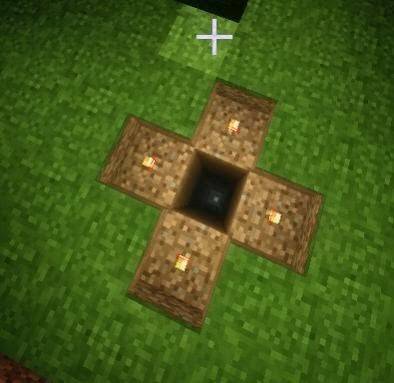
The gallery screenshot below is an author-uploaded scene from the project page, showing a torch-lit pattern around a dark opening. It helps explain the kind of environmental setup represented by the pack; it does not prove that this exact event always occurs or that the current release works on every device. If you try it, copy a world first, follow the project’s Experimental Features notes exactly and keep the original world untouched.

CurseForge gallery screenshot uploaded for The Broken Script Bedrock add-on showing torches around a square opening in the ground
Community gameplay media from Utlover65’s The Broken Script CurseForge gallery. It is shown as an example from the project page, not as an official Minecraft capture or a 26.52 compatibility test.
  • File checked: 2.0.7 .mcaddon, 206.0 MB, uploaded October 1, 2026; project tag 26.50.
  • The author warns about Beta APIs or Experimental settings and possible world griefing or kicks.
  • Use a backup and a separate test world. Treat 26.52 support as unconfirmed unless the creator adds that tag or documents it.
large survival pack

Nightmare Overload: A Broader Survival Horror Mix

Nightmare Overload[Remake] is a more bundled option. Its project description says it combines horror creatures, fog, sounds, abandoned structures and ocean threats; the creator also lists it as multiplayer compatible. The attraction is breadth: rather than adding one stalker, the pack changes several parts of a survival session. That can be appealing to a group, but it also makes troubleshooting harder because multiple add-ons and merged fixes are involved.

The current project listing checked on October 3 names [MainPack-NoVisuals]NightmareOverload_Remake_v3.mcaddon as the newest release, uploaded September 29, 2026, and tagged 26.50. The listing did not expose a file size for this current v3 package in the accessible file record, so this guide does not guess one. Its file name explicitly says NoVisuals; do not assume the optional visual pack is included. The creator’s screenshot caption says the pictured visuals use Vibrant Visuals and will differ without it.

This option makes sense when you want several threats in a new world and are willing to check the pack’s included components. It is not the lightest route and may be less convenient on a constrained device. Since the current source page lists 26.50 rather than 26.52, check the project again before installing and test a copied world before inviting friends. “Multiplayer compatible” is the publisher’s statement, not a promise for every Realm, console or combination of packs.

Checked source field Current listing How to use the detail
Latest file name [MainPack-NoVisuals]NightmareOverload_Remake_v3.mcaddon Recheck the current project page; the name indicates the visual pack is separate
Uploaded / game tag September 29, 2026 / 26.50 The tag is not 26.52, so compatibility is unconfirmed here
File size Not exposed in the accessible current file record Do not estimate it from an older release; inspect the file page before installing
Multiplayer Declared compatible by the publisher Still test the same version and pack set on the intended platform
version boundary example

The Shadow in Nightmare: A Demo with an Older Declared Build

The Shadow in Nightmare is a useful example of why version labels belong beside a horror recommendation. Its publisher describes a demo in which strange world events gradually lead to an encounter with an entity. The latest file checked here is [EF]_The_Shadow_In_Nightmare_[DEMO].mcaddon, a 22.2 MB release uploaded August 24, 2026. The file page lists game 26.40 and a long set of earlier Bedrock releases, but not 26.50 or 26.52.

That does not prove it fails on a later build; it means the public file metadata we checked does not declare those later versions. The project page itself says the add-on is still a demo and may have bugs. Treat it as an older-version option for players whose installed game matches the listed tag, not as a current 26.52 recommendation. If a creator posts a new version, check its date and supported-version list instead of copying an old tutorial’s steps.

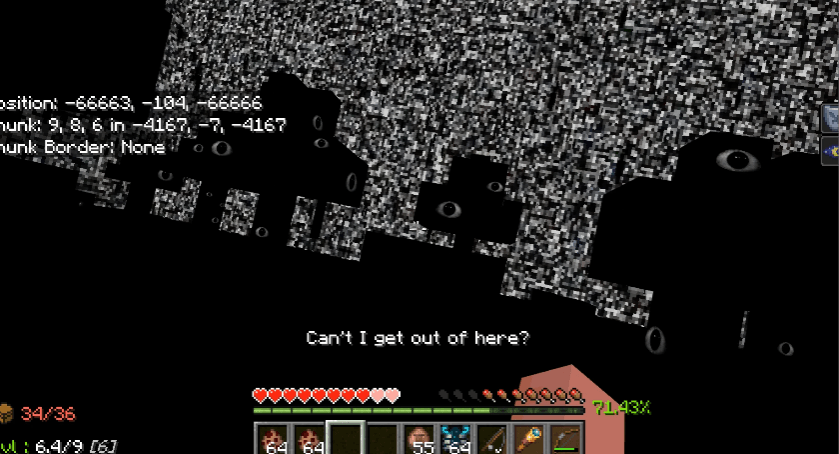
The screenshot below is from the creator’s CurseForge project description and shows a corrupted-looking in-game space with the player HUD. We include it to illustrate the visual direction the author presents. It is creator-submitted community media, not an image from Mojang, a safety certification or evidence that the newest Bedrock update has been tested.

Creator-submitted Bedrock gameplay screenshot from The Shadow in Nightmare showing a distorted dark world and the player HUD
Gameplay preview from EnderFoxBoy_MC’s CurseForge description for The Shadow in Nightmare. The image is community media and does not demonstrate compatibility with Bedrock 26.52.
version and device check

Check the Bedrock Version Before You Import Anything

Minecraft’s official Bedrock 26.52 Hotfix changelog was posted September 25, 2026. Mojang says a hotfix rolls out to each platform as approved, so the version installed on a particular device can lag behind the announcement. The official notes include an Add-ons fix related to older Marketplace worlds after 26.50. That makes it especially important to check the actual build shown by your device, not only the date on an article.

A creator’s supported-version label is the clearest public compatibility signal this guide has for a community Add-on, but it is still a declaration by that project. It is not a test report from Microsoft, CurseForge or this site. A project tagged 26.50 may or may not function on 26.52. A project tagged 26.40 gives you even less evidence about the newest build. Where a current file page does not show the size or a 26.52 tag, keep that uncertainty visible rather than filling the gap with a guess.

Use this quick filter before choosing a Minecraft Bedrock horror mod: if your game build is 26.52 and the project lists only 26.50, either wait for the author’s update or test on a new world you can discard. If the file page has no clear version label, skip it until you can identify the intended build. A recent upload date, high download count or YouTube video is not a substitute for a version row.

Project Latest checked file / date Publisher’s supported build tag Important limit
The Broken Script (Bedrock) 2.0.7 .mcaddon / Oct 1, 2026 / 206.0 MB 26.50 Beta APIs/Experimental settings; author warns about world griefing and kicks
Nightmare Overload[Remake] MainPack-NoVisuals v3 .mcaddon / Sep 29, 2026 / size not shown 26.50 Current listing does not establish 26.52 support; optional visuals are separate
The Shadow in Nightmare Demo .mcaddon / Aug 24, 2026 / 22.2 MB 26.40 and earlier Demo status; not listed for 26.50 or 26.52
safe test flow

How to Get Horror Add-ons on Minecraft Bedrock

The safest workflow is to treat every community add-on as a separate project with its own release history. Open the publisher’s project page from a stable link, read the description and file list, and verify that the selected file is a Bedrock package for your installed version. The links in this guide point to those project pages because the direct download endpoint could not be independently verified from this audit environment; we do not invent a CDN URL or mirror.

Before importing, make a copy of any world you value. If the pack needs Behavior and Resource packs, activate the required components in the world settings described by its author. Enable an Experimental setting only when the current project instructions require it, because those features can affect achievements, pack behavior or future compatibility. Do not install every horror pack at once: a clean single-pack test is much easier to diagnose.

If your platform does not permit the file-import route you have, do not use a random installer or an unrelated Android app to bypass that restriction. Choose a supported Marketplace experience or a creator-supported device path instead. After import, enter a disposable world and check basic loading before deciding whether to add friends or copy a world. Remove the test copy if the pack behaves unexpectedly; restore the untouched backup if you need to go back.

  • Never rename a Java .jar to .mcaddon; the file formats and game editions are different.
  • A file size and a release tag are metadata, not a safety scan or a guarantee that all platforms behave identically.
  • If a stable direct binary cannot be verified, use the named creator project page rather than an unknown mirror.
1

Confirm the edition and build

Read the version shown in your Minecraft settings. Confirm the project is specifically a Bedrock Add-on and compare its listed build tag with the game on this device.

2

Open the named project page

Use the creator’s CurseForge page, check the uploader, file name, date, supported versions, file size and change notes. Do not follow a re-upload that changes the project identity.

3

Back up and import to a test world

Copy a world you care about. Import the .mcaddon through a supported Bedrock flow, then enable the exact packs or Experimental settings the project documents.

4

Test one pack before multiplayer

Start a fresh world, confirm the add-on loads and check its main behavior. Only then test a shared world with the same versions and pack order.

multiplayer limits

Will Bedrock Horror Add-ons Work with Friends?

A multiplayer label on one CurseForge project does not apply to all Bedrock horror add-ons. Players need compatible game builds, the same relevant packs and a host platform that permits the setup. A world can load on one device and still behave differently on another because scripts, resource settings, memory limits or platform rules differ. Ask the creator’s page for the current notes and test a new shared world before moving a main save.

For The Broken Script, the author’s world-griefing and kick warnings should be part of the decision for every player in the session. For Nightmare Overload, the publisher says multiplayer compatible, but the latest declared game tag is 26.50 and this guide has not independently tested a Realm or console. For The Shadow in Nightmare, the visible release is an older demo. Keep those project-specific limits attached to the recommendation; do not turn one project’s listing into a general Bedrock promise.

A practical group test is simple: choose one add-on, compare the game and file version on each device, agree to use a new world, and keep a copy before enabling the pack. If an issue starts after adding a second pack, return to the clean test and add one component at a time. This helps distinguish a version mismatch from a conflict without putting the main world at risk.

source notes

Project Pages and Official Bedrock References

keep exploring

Related Verity Mod Guides

common questions

Minecraft Bedrock Horror Mods FAQ

Do these Minecraft Bedrock horror mods list support for Bedrock 26.52?

No checked project file listed 26.52 on October 3, 2026. The newest selected files list 26.50, and The Shadow in Nightmare lists 26.40. A release tag is the publisher’s declared game version, not a compatibility test, so check the project page again and test in a copied world.

How do I get horror add-ons on Minecraft Bedrock?

Open the named creator project page, select the file that matches the game version on your device, inspect the .mcaddon name and publisher notes, then import it using Minecraft’s supported Add-Ons flow. Enable the required behavior or resource packs for a disposable test world. Back up important saves first.

Can I use a Java horror mod on Bedrock?

Usually no. A Java mod packaged as a .jar depends on Java Edition and its loader. Bedrock uses its own add-on import and pack system; a similarly named project or a fan port is a separate file that must be checked on its own page.

Are Bedrock horror add-ons safe for my main world?

Do not assume so. The Broken Script author warns that the add-on can damage a world and requires Beta APIs or Experimental settings. Test any world-changing pack on a copy with a backup before using it in a valuable save.

Can I play Bedrock horror add-ons with friends?

Only when the specific project and the host’s platform setup support the same add-on. Nightmare Overload’s publisher describes it as multiplayer compatible, but that does not prove every Realm, console, version or other add-on combination works. Verify the current project notes and test with a new shared world.