
Verity Mod MinecraftVerified Minecraft mod download guide
English
gameplay guide

How to Use Verity Mod: Gameplay and Survival Tips

The short answer: load the matching Verity JE profile, create a fresh test world, let the box and assistant appear, then test one interaction at a time before adding voice chat or multiplayer. This guide explains what to do after installation, what the current Java project actually documents, and where to look when Verity or an event does not respond.

Official Verity JE yellow assistant floating above a Minecraft forest
Official Verity JE project media from Modrinth. It identifies the playable Java project; it is not official Mojang content.
checked play baseline

Verity Mod Facts Checked on August 19, 2026

Project Verity JE on Modrinth
Java release 6.0.0-beta.6, published August 18, 2026
Minecraft 1.20.1
Loader Forge
File verity-6.0.0-beta.6.jar, 257,909,392 bytes
Test rule Use a backup and a disposable world first
answer first

How to Use Verity Mod After Installing It

How to use Verity Mod is mainly a gameplay question, not another download question. Start with the Java profile that matches the source page, launch a new world, and wait for the first Verity elements to load. Do not judge the mod from a short video alone: the project version, Forge profile, AI connection and world state all affect what you see.

For the current checked baseline, use Verity JE 6.0.0-beta.6 with Minecraft 1.20.1 and Forge. The Modrinth project describes a personal AI assistant, an animated box, world changes, extreme darkness and the Verity Demon. It does not publish one guaranteed trigger script for every event, so treat the first session as a controlled test rather than a speedrun with promised jumpscares.

If you have not installed the file yet, use the Verity Mod install guide first. If the base mod loads but the AI setup fails, continue to Verity AI setup. This page begins once Minecraft can open the profile and you want to understand what to do in the world.

before your first test

Before Your First Verity Mod Gameplay Session

A clean test makes the answer to how to play Verity Mod much easier to verify. Back up your important saves, create a separate Forge instance if your launcher allows it, and use a new world with no unrelated gameplay mods. Keep the Modrinth project page open so you can compare the release, loader and file name instead of trusting a cached setup video.

The AI layer and the Minecraft layer should be checked separately. First confirm that the .jar is recognized and that the world launches. Then look for the box or assistant. Only after the local entity appears should you diagnose an API key, model, language or network issue. Adding voice chat at the same time makes a simple Java problem much harder to isolate.

Check What to prepare Why it matters
Profile Minecraft 1.20.1 with Forge and Verity JE 6.0.0-beta.6 A wrong loader or game version can prevent the mod from loading
World A new, disposable test world Horror events and gameplay changes should not risk a valuable save
Network One controlled AI request and your own provider key when required Separates online authorization from local Minecraft compatibility
Notes Release number, error text and the step that failed Makes a later support check more useful than a vague screenshot
five-step workflow

5-Step Verity Mod Gameplay Workflow

Use this sequence when you want a repeatable first run. It answers how to use Verity Mod without assuming that every player receives the same event at the same minute. The project description is the source for listed features; the order below is a practical testing method built around those facts.

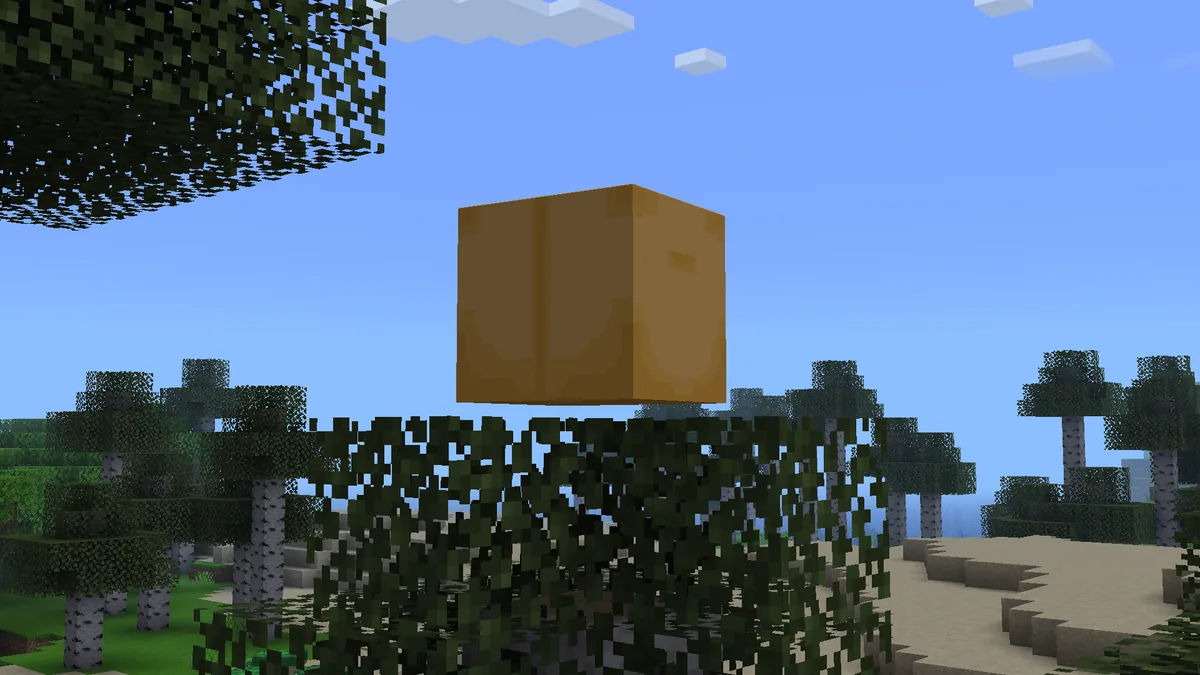
Official Verity JE box floating above Minecraft leaves
Official Verity JE gallery media from Modrinth. The box is a useful first visual signal, but its appearance does not prove that the AI connection is working.
1

Create a clean profile

Launch the checked Forge profile with only the files needed for the test. Record the version before entering the world.

2

Make a new world

Use a disposable world and a safe difficulty for the first load. Keep your main save closed until the mod behaves as expected.

3

Find the first signal

Look for the box or yellow assistant and give the world time to finish loading. Do not add voice extras yet.

4

Test one interaction

Try one short typed prompt or the interaction described by the current project tutorial, then observe the response and log.

5

Record and stop safely

Note what appeared, back up the test world and decide whether you need the AI, voice, horror or multiplayer guide next.

features and limits

What Verity Mod Actually Does

The answer to how does Verity Mod work has two parts. The Java mod supplies the Minecraft-side entity and event behavior, while the project describes an AI-powered personal assistant that can respond through a provider connection. The animated box, darkness, music or Demon behavior belongs to the gameplay experience; it should not be treated as proof that an API request succeeded.

The current source lists an official Demon model and several world or personality changes, but it does not document a complete deterministic event timetable. A video may show a late-stage sequence while your clean world is still waiting for an earlier condition. Check the release and configuration before concluding that an event is missing.

That distinction also keeps the page honest about the difference between the ThatMob story and the playable Verity JE project. For the narrative and ARG context, read the Verity horror explanation. For a gameplay test, stay with the source-checked Java build and observe what the installed version actually does.

ai versus voice

How to Talk to Verity Without Mixing AI and Voice Chat

Players often search how to play Verity Mod when they really mean one of three actions: interact with the local entity, send a typed AI request, or speak through a voice-chat or TTS setup. Test them in that order. A working box does not guarantee a working provider key, and a working typed response does not prove that microphone permissions or speech-to-text are configured.

For AI testing, use your own provider credential and the current project tutorial. Send one short English prompt first because the project separately describes its speech-to-text and text-to-speech testing limits. If text works but the microphone is silent, use the voice setup guide rather than reinstalling the entire mod. Never post an API key in a screenshot, crash log or multiplayer pack.

What you see Most useful next check Do not assume
The box appears Test one controlled local interaction That the provider key or voice path is valid
Typed AI response works Try your intended language, then voice separately That every speech language was tested by the project
Microphone or TTS fails Check permissions, voice configuration and the voice guide That a new .jar will fix an audio setting
A horror event appears Record the version and world conditions That an old video's exact timing is guaranteed
troubleshooting

If Verity Does Not Respond or an Event Does Not Appear

First decide which layer failed. If Minecraft crashes before the world opens, return to the Java compatibility guide and check Forge, the Minecraft version and duplicate .jar files. If the world opens but Verity never appears, test with only the required profile and read the launch log. If the entity appears but a prompt fails, inspect the provider key, model, network response and exact error code.

If one event does not appear, do not immediately add several mods or use an unofficial “fix” file. Reload the clean test world, check the release notes, and allow the version to reach the condition described by the official project material. A missing event can be a version difference, a configuration boundary, a world-state condition or simply a feature that the source does not promise to trigger on demand.

Official Verity JE Demon model shown in a close Minecraft view
Official Verity JE project media from Modrinth. It documents the listed Demon model, not a guaranteed trigger sequence for every world.
  • Confirm the profile is Minecraft 1.20.1 with Forge before changing AI settings.
  • Remove duplicate or old Verity .jar files from the test profile.
  • Test in a new world with unrelated mods and add-ons disabled.
  • Copy the exact error code instead of describing every failure as a broken mod.
  • Revoke a provider key if it may have been exposed in a log or screenshot.
  • Stop testing on the main save until the clean profile is understood.
choose the right guide

When to Use the Java, Horror, Voice or Multiplayer Guide

A useful guide boundary saves time. Use this page for post-install gameplay orientation and a controlled first run. Use the Java page for the file, Forge and compatibility baseline; use the install page for edition and folder steps; use the horror page for the ARG, darkness and Demon explanation; use the voice page for microphone, TTS or voice-chat errors; and use the multiplayer page before adding a server or friends.

The project is a beta release, and the checked version can change after the date above. Recheck the official Modrinth entry before updating. If your installed version differs, keep the same testing order but treat feature names, model choices and event timing as version-specific rather than guaranteed.

Your question Best page Why
Which file and loader do I need? Verity Mod Java Owns the source-checked .jar and Forge compatibility
How do I put the mod in Minecraft? Install Verity Mod Owns edition, folder, import and backup steps
Why did darkness or the Demon appear? Verity Horror Explained Owns the narrative and documented horror mechanics
Why is voice or TTS silent? Voice Setup Owns microphone, speech and voice-chat troubleshooting
Can friends join my world? Multiplayer Guide Owns client/server version and host checks
safe summary

How to Use Verity Mod: A Practical Summary

Use a matching Forge profile, a new world and one controlled interaction. Let the box or assistant appear before adding voice or multiplayer. Keep AI authorization separate from local mod loading, record the exact version and error text, and treat the official project page as the authority for fields and release-specific behavior. That is the most reliable answer to how to use Verity Mod when videos, mirrors and older tutorials disagree.

For the checked baseline, the source was Verity JE 6.0.0-beta.6 for Minecraft 1.20.1 with Forge, using the file verity-6.0.0-beta.6.jar. The release was published August 18, 2026 and checked here on August 19, 2026. Recheck Modrinth before installing a later release, back up your worlds, and keep the test profile separate from a save you care about.

next steps

Related Verity Mod Guides

gameplay faq

How to Use Verity Mod FAQ

How do I use Verity Mod after installing it?

Launch the matching Minecraft 1.20.1 Forge profile, create a new test world, let the box or assistant load, and test one interaction before adding voice or multiplayer.

How do I play Verity Mod safely?

Back up important worlds, use a disposable world and a clean Forge profile, record the version and test the mod before opening your main save.

What does Verity Mod do in Minecraft?

The Verity JE project lists an AI-powered assistant, an animated box, world changes, extreme darkness and the Verity Demon. Exact event timing can depend on the release and world state.

How does Verity Mod work with AI?

The Minecraft mod supplies the local entity and gameplay features, while the project describes a provider-connected AI assistant. Test local loading before troubleshooting the key or network.

Why is Verity Mod not responding?

Separate a Java or Forge load failure from an AI request failure. Check the profile, duplicate files, provider key, model, network response and exact error code in that order.

Can I use Verity Mod in multiplayer?

Check the client and server combination first. Use a clean test profile and the multiplayer guide because the official project description does not guarantee every host or server setup.